
TeachLive Guide For Current Students and Faculty
Check out how TeachLive is used in our Teacher Education courses!
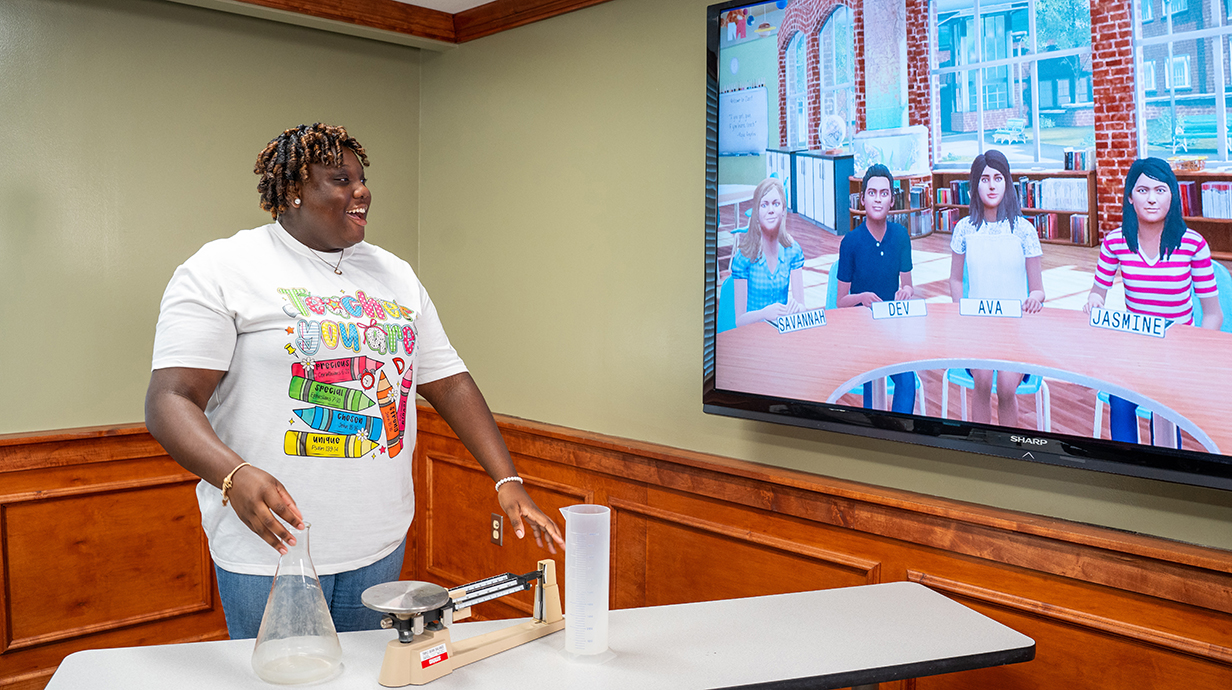
TeachLive in Teacher Education
As a part of the Teacher Education program, you will have the chance to participate in several TeachLive sessions, where you will refine your lesson plan delivery, classroom management procedures, and communication skills. You will face realistic and challenging situations with virtual students who have different personalities, abilities, and needs. Additionally, you will learn how to adapt your instruction, engage your learners, and assess their progress.
Current Students
Please locate your course below for information on scheduling, lesson plan uploads, assignment requirements, and other materials needed to successfully complete your TeachLive assignments.
TeachLive EDCI 3520
EDCI 3520 explores key aspects of the education profession, such as the structure of education in America, the developmental stages of children and adolescents, and the diversity of learners and educators. During this course, you will experience TeachLive by practicing your teaching skills with virtual students who have realistic and diverse personalities, behaviors, and responses. You will teach a 10-12 minute lesson plan that will be provided based on your program area. In addition, you will be able to watch a recording of your session and learn from your strengths and weaknesses. The goal of this TeachLive experience is to help you develop confidence and essential classroom management skills required for real classrooms.
- You will receive an email from teachlive@olemiss.edu welcoming you to Mursion, the TeachLive portal.
- Within the email, follow the link: “Visit your Dashboard to Get Started.”
- You will be prompted to create an account.
- Once you have created your account, you will be able to schedule your session using the calendar within the portal.
- You will receive a confirmation email verifying your TeachLive session’s date and time.
Returning Users:
- You will receive an email inviting you to schedule your session.
- You will be a returning user. Login with the same credentials you used for EDCI 3520 with your @go.olemiss.edu email address.
- After you log into your Mursion account, click on the “Dashboard” tab.
- Next, click the “schedule” button to book your session.
- After you have scheduled your session, you will receive an email confirmation with the details.
Elementary:
Special Education:
- Sped ELA Lower Option 1
- Sped ELA Lower Option 2
- Sped ELA Upper Option 1
- Sped ELA Upper Option 2
- Sped Math Lower
- Sped Math Upper
- Sped Secondary English
- Sped Secondary Math
Secondary:
Music/Health:
Following your TeachLive session, you will receive a video recording and a rubric with feedback from a veteran teacher. The video recording can be accessed through the Mursion Portal, and the feedback rubric will be emailed to you within ten days of your session.
The rubric is designed to evaluate delivery, management, and assessment skills. It will also include suggestions for improvement and areas of strength.
The TeachLive Coordinators are only responsible for delivering your TeachLive experience. Any assignments associated with TeachLive are allocated by your course instructor.
Please Note: This experience is NOT graded by TeachLive! The goal of this experience is to help you get comfortable teaching a lesson on your own.
TeachLive EDCI 3530
EDCI 3530 introduces students to current and emerging trends and factors that affect classroom practice. During this course, you will experience TeachLive by practicing your teaching skills with virtual students who have realistic and diverse personalities, behaviors, and responses. You will create and teach a 10-12 minute lesson plan based on your program area. In addition, you will be able to watch a recording of your session and learn from your strengths and weaknesses. The goal of this TeachLive experience is to help you develop confidence and essential classroom management skills required for real classrooms.
- You will receive an email from teachlive@olemiss.edu welcoming you to Mursion, the TeachLive portal.
- Within the email, follow the link: “Visit your Dashboard to Get Started.”
- You will be prompted to create an account.
- Once you have created your account, you will be able to schedule your session using the calendar within the portal.
- You will receive a confirmation email verifying your TeachLive session’s date and time.
Returning Users:
- You will receive an email inviting you to schedule your session.
- You will be a returning user. Login with the same credentials you used for EDCI 3520 with your @go.olemiss.edu email address.
- After you log into your Mursion account, click on the “Dashboard” tab.
- Next, click the “schedule” button to book your session.
- After you have scheduled your session, you will receive an email confirmation with the details.
You must submit your lesson plan ONE WEEK before your TeachLive experience
- Using the dropdown menu below, click on the month and select link for the week of your scheduled session.
- Upload your lesson plan using the submission portal. For example, if your session is scheduled for March 27th, you must submit your lesson plan using the March 25th-29th submission link.
- You will not receive an email confirmation for your lesson plan submission. If we have trouble accessing your lesson plan or have any questions, we will reach out to you.
During EDCI 3530, you will create and deliver a lesson plan based on your program area using the EDCI 353 Lesson Plan Template. This will give you more autonomy and ownership over your teaching, as well as more opportunities to practice and improve your skills.
Following your TeachLive session, you will receive a video recording and a rubric with feedback from a veteran teacher. The video recording can be accessed through the Mursion Portal, and the feedback rubric will be emailed to you within ten days of your session.
The rubric is designed to evaluate delivery, management, and assessment skills. It will also include suggestions for improvement and areas of strength.
The TeachLive Coordinators are only responsible for delivering your TeachLive experience. Any assignments associated with TeachLive are allocated by your course instructor.
Please Note: This experience is NOT graded by TeachLive! The goal of this experience is to help you get comfortable teaching a lesson on your own.
Student Testimonials
Special Scenario Request
Are you a current instructor wanting to utilize TeachLive in your course in a new way? Fill out the Special Scenario Request form below and let's get started!